• Home
  • Товары
      • Back
      • Программное обеспечение myCNC
          • Back
          • Основные функции
          • Установка myCNC
          • Основные преимущества
          • Обновления
      • Сравнение плат myCNC
      • Электронные комплекты myCNC
      • ET6
          • Back
          • myCNC-ET6
          • myCNC-ET6 Reflash Firmware (ru)
          • myCNC-ET6 - Диагностика неполадок
      • ET7 (ru)
          • Back
          • myCNC-ET7 (ru)
          • myCNC-ET7 Reflash Firmware (ru)
          • myCNC-ET7 - Диагностика неполадок
      • ET10 (ru)
          • Back
          • myCNC-ET10 (ru)
          • Перепрошивка myCNC-ET10
      • Система CNC Vision
      • Датчики и центроискатели
      • Устройства Modbus
      • Устаревшие продукты
          • Back
          • ET1
          • ET3
          • ET5
          • Дополнительная плата THC
          • Комплект ET3+7PC
  • Применения
      • Back
      • Плазменная/газовая резка
          • Back
          • Профили плазменной резки
          • Примеры плазменной резки
          • Профиль газовой резки
      • Тангенциальная резка
          • Back
          • Профиль тангенциальной резки
          • Примеры тангенциальной резки
      • Фрезерование
          • Back
          • Примеры фрезерования
          • Профили фрезерования
      • Фрезерование по дереву
      • CNC Vision (камера)
          • Back
          • Настройка CNC Vision
          • Демо CNC Vision
      • Токарная обработка
      • Фрезерование и токарная обработка
      • Лазерная резка
      • Роботика
      • Машины спецпредназначения
      • Зуборезная синхронизация
  • Цены
  • Скачать
  • О нас
      • Back
      • Наша цель
      • Наша история
      • Клиентура по миру
  • Онлайн-магазин
  • Поддержка
      • Back
      • Документация
      • Связаться с нами
  • Поиск
  • Блог
  • Форум
  • Файлы
      • Back
      • Фото
          • Back
          • Машины клиентов
      • Видео
          • Back
          • Видео клиентов
          • Обучающие видео
  1. Главная
  2. Blog (ru)

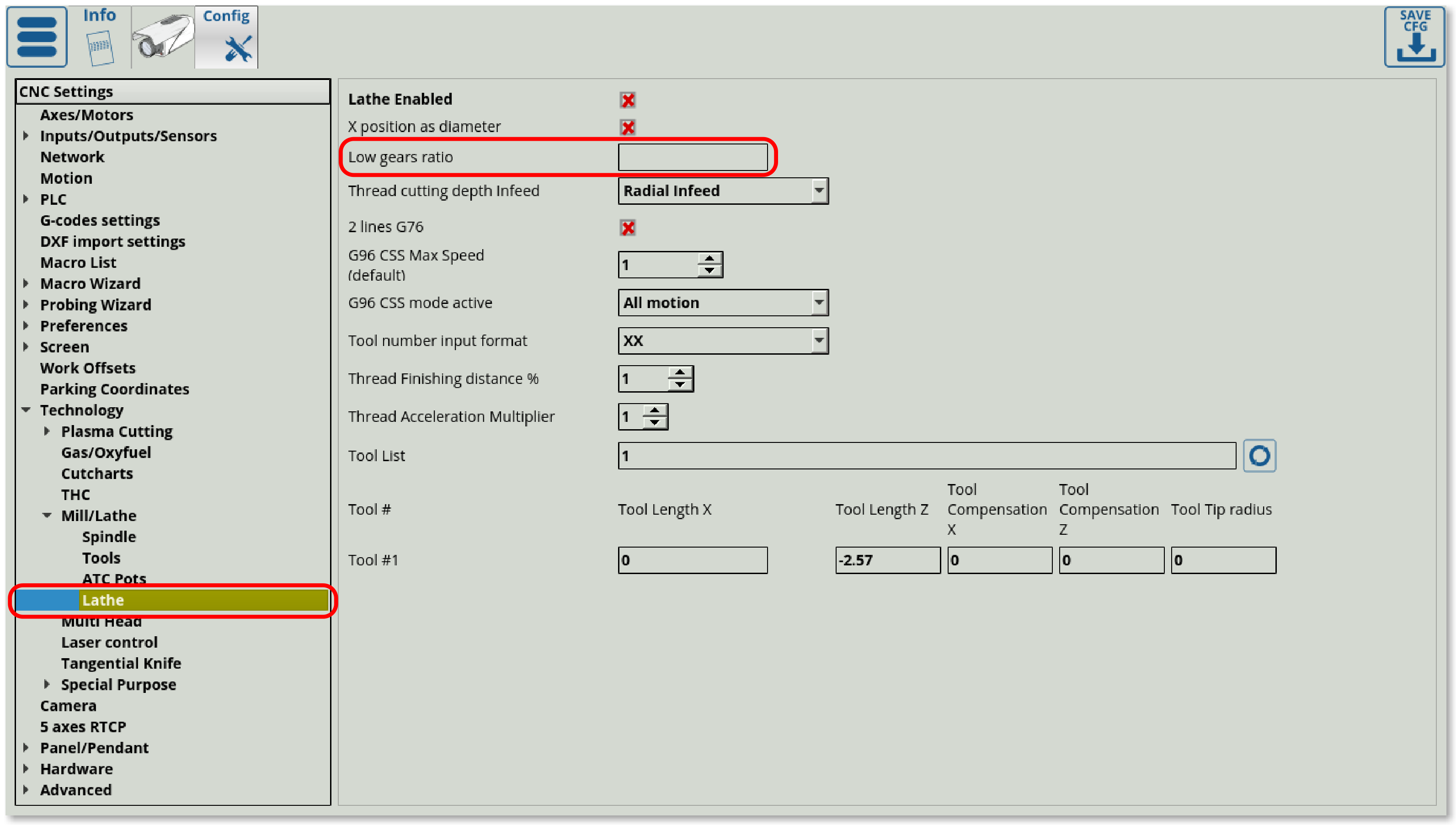
Low gear ratio control for lathes added to myCNC (ru)

Low gear ratio control, which allows the user to switch to a lower gear on lathe machines for increased torque, has been added to myCNC. Previously, extensive alterations of G-code had to be performed in order to switch gears on-the fly, This setting allows the user to quickly switch between the regular (high) gear ratio and the low gear ratio, all the while maintaining constant spindle speed. The M41 G-code command switches the machine to a lower gear ratio, while the M42 switches it back up, with the user-provided ratio being automatically used to seamlessly transition between the two.

The latest release of the myCNC software can be downloaded from our Downloads page, or by going into Settings> Support within the myCNC app.

[Docs] New manual for wireless pendant setup added (ru)

A new manual on wireless pendants has been added to the myCNC Documentation. The manual describes the setup and the settings in Panel/Pendant> Wireless Pendant/XHC, as well as goes into detail about the different actions that can be assigned to the pendant controls during the setup process. The process is designed to allow for a vast array of customization depending on the user's particular pendant and machine configuration.

The manual can be found here. Stay tuned for more documentation updates.

Fume exhaust control on a plasma cutting machine using myCNC (ru)

Our colleagues from Ukraine have shared a video of a unique fume exhaust control setup on a plasma machine which is running with the help of a myCNC-ET7 controller. The different fume extractor hoods open progressively as the machine moves across the plasma cutter table, allowing the machine to only run the fume exhaust directly where the current cutting position is located.


Post Processor for Fusion360 now in development (ru)

The myCNC team is currently working on developing a post processor for Fusion360. News regarding the post will be available on our blog, stay tuned for further updates.

Flatbed Correction AutoMeasure (ru)

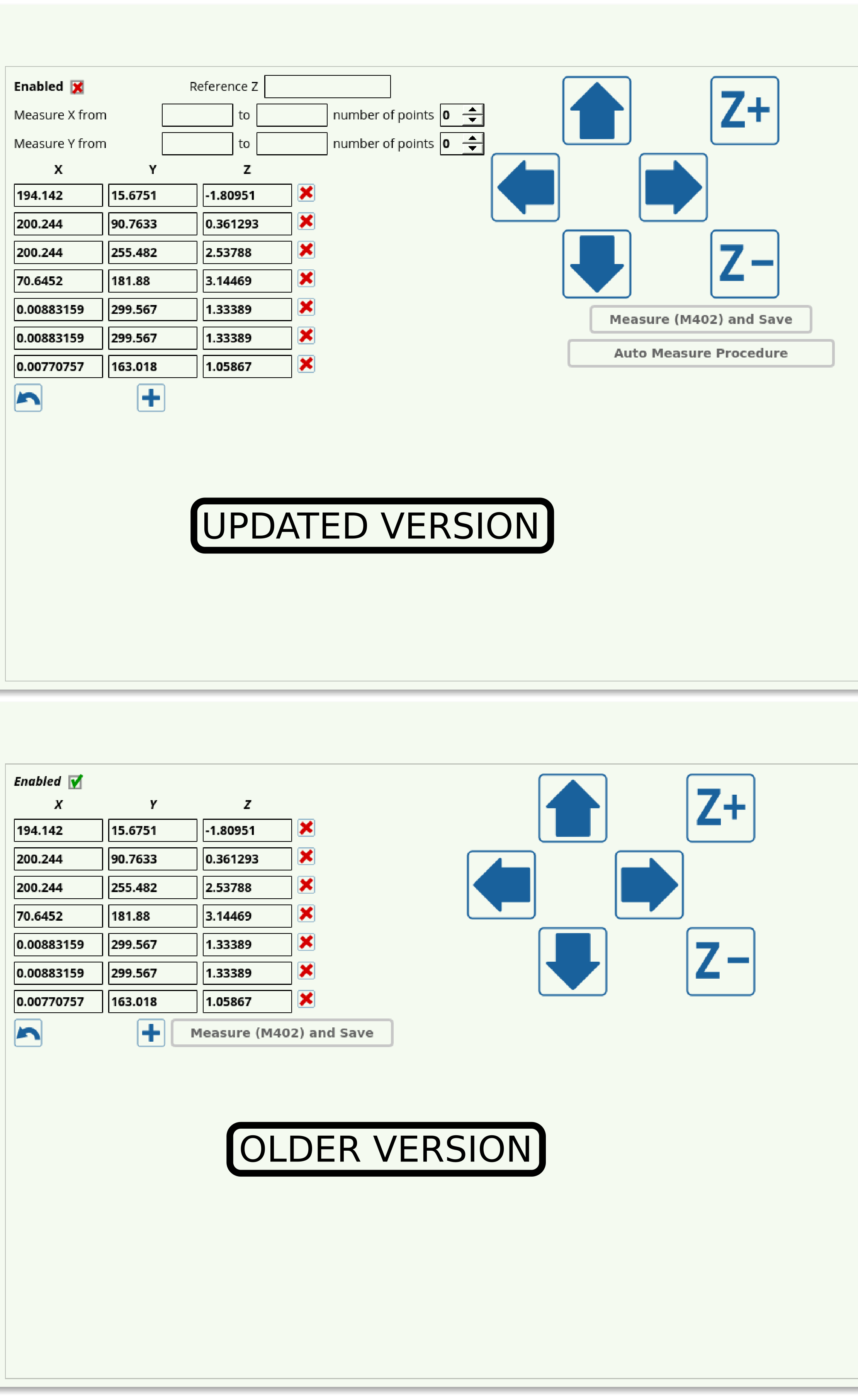
An automatic measurement procedure has been added to flatbed correction in myCNC software. Flatbed correction allows the user to account for the uneven portions of the working surface, by recording the surface z-coordinates over the entire working area or some part of it.

Previously, the process of selecting the points at which the height measurements would be taken was done manually, with the user moving the probe over the surface and lowering it down at each individual point which the software would then record. In the most recent myCNC version, this process has been automated. The user can now set the number of points that the machine must measure, and the coordinates of the area which the machine will be measuring, with the software automatically splitting that area into a number of zones to probe and record the surface height variations.

For more information on Flatbed Correction, please visit its Documentation page.
  1. [Docs] New manual for DXF file import added (ru)
  2. Probe Sensors now available (ru)
  3. Automatic calibration system added to CNC Vision (ru)
  4. Faster laser cutting with the fly-cut option (ru)

Страница 7 из 11

  • 2
  • 3
  • 4
  • 5
  • 6
  • 7
  • 8
  • 9
  • 10
  • 11
Puruvesi Automation
78 George St #204, Ottawa, ON K1N 5W1, Canada

+1 613 413 2223
sale@pv-automation.com
About
  • About Us
  • Global Reach
  • Our Projects
  • Blog
Technical Support
  • Contact Us
  • Documentation
  • FAQ
© 2013 - 2026 Puruvesi Automation. All rights reserved.